Chrome 79 brings some important changes in its CORS implementation, rolling out now, which mean that CORS preflight OPTIONS requests will no longer appear in the network tab of the Chrome developer tools.
CORS?
Cross-Origin Resource Sharing (CORSopens in a new tab) allows web servers to tell browsers which web applications are allowed to talk to them.
This applies when a web application tries to send a request to a server with a different origin, for example a page hosted at https://example.com tries to make a request to https://api.mybank.com. For simple requests that are defined to not cause side effects, the browser will make the request, but examine the Access-Control-* headers on the response from the server before allowing the web application to read that data.
For more dangerous requests, which could trigger an action on the server, the browser sends a so-called "preflight" request. Before sending the real request, it sends an OPTIONS request to the server that includes Access-Control-Request-* headers describing the method and any restricted headers that the application would like to send. The server then responds with a response including its own Access-Control-* headers, which tell the browser whether or not this is allowed.
If it's allowed, the browser goes on to send the real request, if not then the application isn't allowed to make that request, so it fails.
Phew, make sense? This is just an outline of CORS, there's quite a bit more detail available in MDN's docsopens in a new tab. It trips up quite a few people, and checking that you've done it securely on the server side (i.e. you're not allowing other malicious web applications to do or read things they shouldn't) is harder still.
Changes in Chrome 79
In Chrome 79, a new flag was added:

If you're running 79+, you can see this on the chrome://flags page. It appears that this was disabled by default at the release in December 2019, but it's intendedopens in a new tab to be enabled incrementally over the weeks from January 6th 2020, which brings us to approximately today, where peopleopens in a new tab are seeing this for themselves.
When this flag is enabled, the CORS handling logic is moved entirely out of the core Blink browser engine. In general this is a good thing - CORS is a core security feature, browser engines are very exposed to untrusted remote inputs, and trying to isolate the two from one another is a great move for security.
In practice, the main visible change from this is that CORS preflight requests will no longer appear in the Chrome developer tools network tab. That means debugging CORS - already tricky - just got quite a bit harder, because these requests are going to be completely invisible to you.
They'll also no longer be considered as a separate entry by the resource timing APIopens in a new tab.
There's a bit more background on this from Mike Westopens in a new tab on the Chrome security team:
We moved CORS checks out of our renderer process to (among other things) ensure that we’re not exposing cross-origin data to Spectre, et al. In the short-term, this is a pain in the ass for developers, and I’m sorry for that. I do hope it’s temporary. - https://twitter.com/mikewest/status/1227918108242989056
Judging from the bug discussionopens in a new tab there's a bit of an outline on how this might be resolved in future whilst keeping CORS outside Blink itself, but not a lot of progress or detail yet, so I wouldn't bet on this changing any time soon.
What can I do about this?
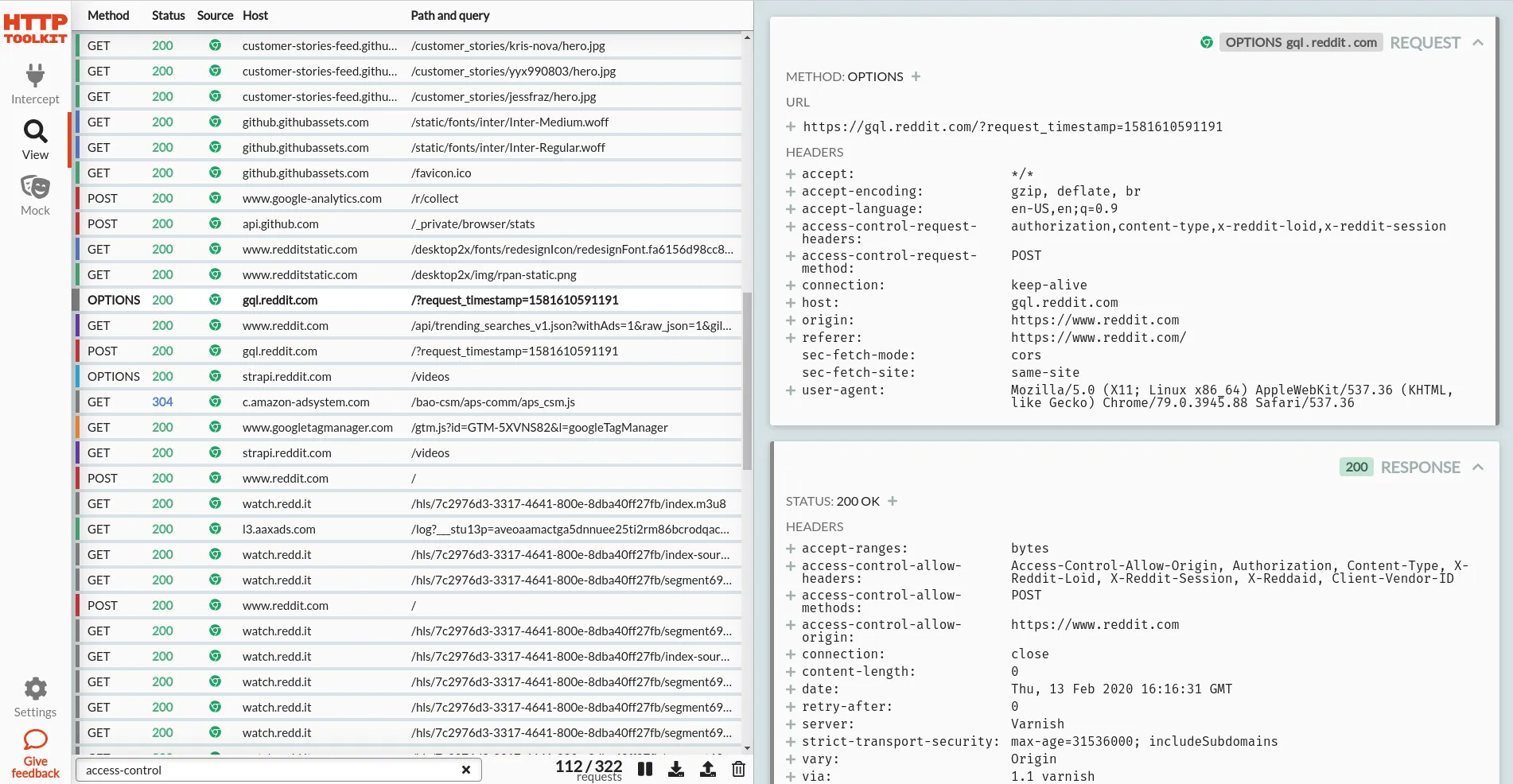
Cheeky plug: you could debug Chrome's HTTP traffic with HTTP Toolkitopens in a new tab instead. HTTP Toolkit lets you collect all traffic the browser sends, even for CORS requests (or any other requests) that happen outside the core renderer process.
One-click setup to start intercepting Chrome, and then you can see literally everything, with a far nicer UI than the network tab to boot:
There are other options too though:
- You can manually disable this flag in your browser on the
chrome://flagspage, but do be aware that this non-Blink CORS implementation does have some different behaviour compared to the Blink one (see the design docopens in a new tab). If you want to see the same thing as your users, you probably don't want to leave this enabled all the time. - You can take a NetLog dumpopens in a new tab from Chrome, to log the full requests and examine them elsewhere.
- You can test with another browser, like Firefox.
- You can use hosted HTTP request recording & reporting tools, like WebPageTestopens in a new tab.
- You can use any other standalone HTTP debugging tools, like Fiddler or Charles, which should also still be able to collect this traffic.
When you do start seeing CORS requests failing for no good reason though, none of these are quite as convenient as being able to check the preflight inline...
Want to see & explore all your HTTP traffic? Get started with HTTP Toolkitopens in a new tab now.
Suggest changes to this pageon GitHubopens in a new tab